
Last updated: March 16, 2026
Planning to pick up a rental car at Raleigh-Durham International Airport (RDU)? At RDU, rental car customers use the airport’s green Rental Car shuttle stops outside baggage claim to reach their rental car company. If you arrive at Terminal 1, head to Zone 4. If you arrive at Terminal 2, head to Zone 5. This guide explains where to go, how the shuttle works, and what to know before you drive away. Since pickup procedures and counter hours can vary by provider, it is always smart to confirm your rental company’s latest instructions before travel.
Quick Facts: Renting a Car at RDU Airport
- Airport code: RDU
- How do I get to my rental car company?: Use the green Rental Car shuttle stops outside baggage claim
- Terminal 1 shuttle pickup: Zone 4
- Terminal 2 shuttle pickup: Zone 5
- Which companies operate at RDU?: Current airport listings include Alamo, Avis, Budget, Dollar, Enterprise, Hertz, National, Payless, Sixt, and Thrifty
- Best tip before pickup: Follow the Rental Car signs after baggage claim and check your reservation details before leaving the terminal
Step 1: Choose Your Rental Car Company
Booking your rental car before arrival can make pickup much easier, especially during busy travel periods. It also gives you time to confirm your rental company, review the provider’s current pickup instructions, and keep your reservation details ready before you land.
Step 2: Collecting Your Luggage
After landing at RDU, follow signs to baggage claim in your terminal and collect your luggage. Once you have your bags, look for signs pointing to ground transportation and rental cars so you can head to the shuttle pickup area.


Step 3: Finding the Rental Car Counters
RDU says rental car customers should catch the shuttle bus for their rental car company at the green Rental Car shuttle stops outside baggage claim.
- Terminal 1: Zone 4
- Terminal 2: Zone 5
Follow the airport signs to the correct zone for your terminal and board the shuttle for your rental company.
Step 4: Completing Your Rental Agreement
Once you arrive at your rental company’s counter or service area, have your driver’s license, payment card, and reservation confirmation ready.
Before leaving the counter, review your rental agreement carefully and make sure you understand:
- any optional extras or additional driver fees
- the final total
- the fuel policy
- the return time
Step 5: Picking Up Your Rental Car
After the paperwork is finished, head to the designated pickup area for your vehicle. Before driving away, inspect the car for scratches, dents, wheel damage, or interior issues, and make sure any existing damage is documented by the rental company.
It also helps to take a few quick photos and confirm that the vehicle matches the booked class or an approved equivalent.
Step 6: Inspect Your Rental Car
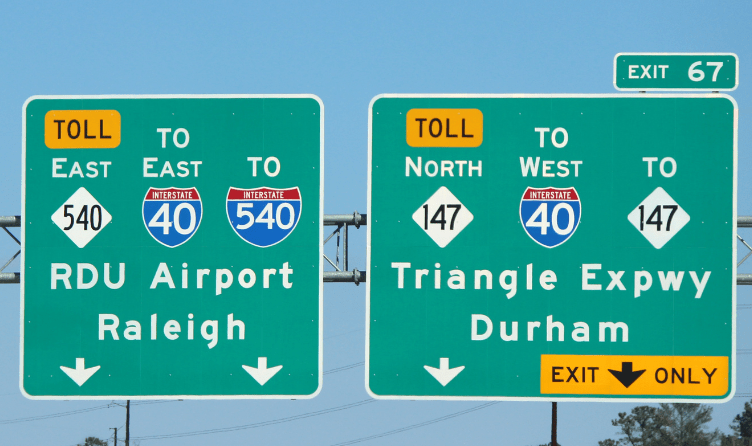
Once you are in the car, follow signs toward the airport exits and major roads serving the Triangle area, including I-40 and I-540. If you are heading toward Raleigh, Durham, Chapel Hill, or elsewhere in central North Carolina, it helps to set your route before leaving the airport area
Step 7: Heading Out
Now that you have your rental car, you can head out from RDU to your destination. The airport is conveniently located with easy access to major highways such as I-40 and I-540, which can take you to Raleigh, Durham, or Chapel Hill, as well as other parts of North Carolina.
Final Tips
- Book ahead when possible to improve availability and pricing
- Follow the green Rental Car shuttle signs outside baggage claim
- Double-check whether you are arriving at Terminal 1 or Terminal 2
- Keep your driver’s license, payment card, and reservation confirmation ready
- Review your provider’s pickup and return instructions before your trip
Frequently Asked Questions About RDU Airport Rental Cars
RDU rental car customers use the airport’s green Rental Car shuttle stops outside baggage claim to reach their rental company
At Terminal 1, RDU says the green Rental Car shuttle stop is at Zone 4 outside baggage claim.
At Terminal 2, RDU says the green Rental Car shuttle stop is at Zone 5 outside baggage claim.
Current airport listings include Alamo, Avis, Budget, Dollar, Enterprise, Hertz, National, Payless, Sixt, and Thrifty
In most cases, you should bring your driver’s license, payment card, and reservation confirmation.
After pickup, follow airport signs toward the major roads serving the Triangle, including I-40 and I-540.
Conclusion
Picking up a rental car at Raleigh-Durham International Airport is usually straightforward once you know where the shuttle stops are. After baggage claim, head to the green Rental Car shuttle stop for your terminal, complete your paperwork, inspect your vehicle, and you will be ready to hit the road.
To make the process smoother, confirm your rental company’s latest RDU pickup instructions before your trip and double-check whether you are arriving at Terminal 1 or Terminal 2. A little preparation can make your RDU rental car pickup much easier.
